Mootion: Create Stunning Videos Quickly
Quick summary
- Transform text and media into videos effortlessly.
- Access diverse templates for various video needs.
- Enjoy user-friendly interface for simple video creation.
- Receive ongoing updates with lifetime access.
Mootion is an intuitive AI video generator that transforms ideas, text, images, and audio into professional-level videos. With its user-friendly interface and versatile templates, Mootion simplifies video creation for marketing, education, and social media purposes, keeping your audience engaged.
This affordable tool reduces the complexity of video production, making it accessible for both beginners and experienced creators. Enjoy lifetime access to all its updates, guaranteeing you a streamlined and efficient video production experience.
What Mootion Does?
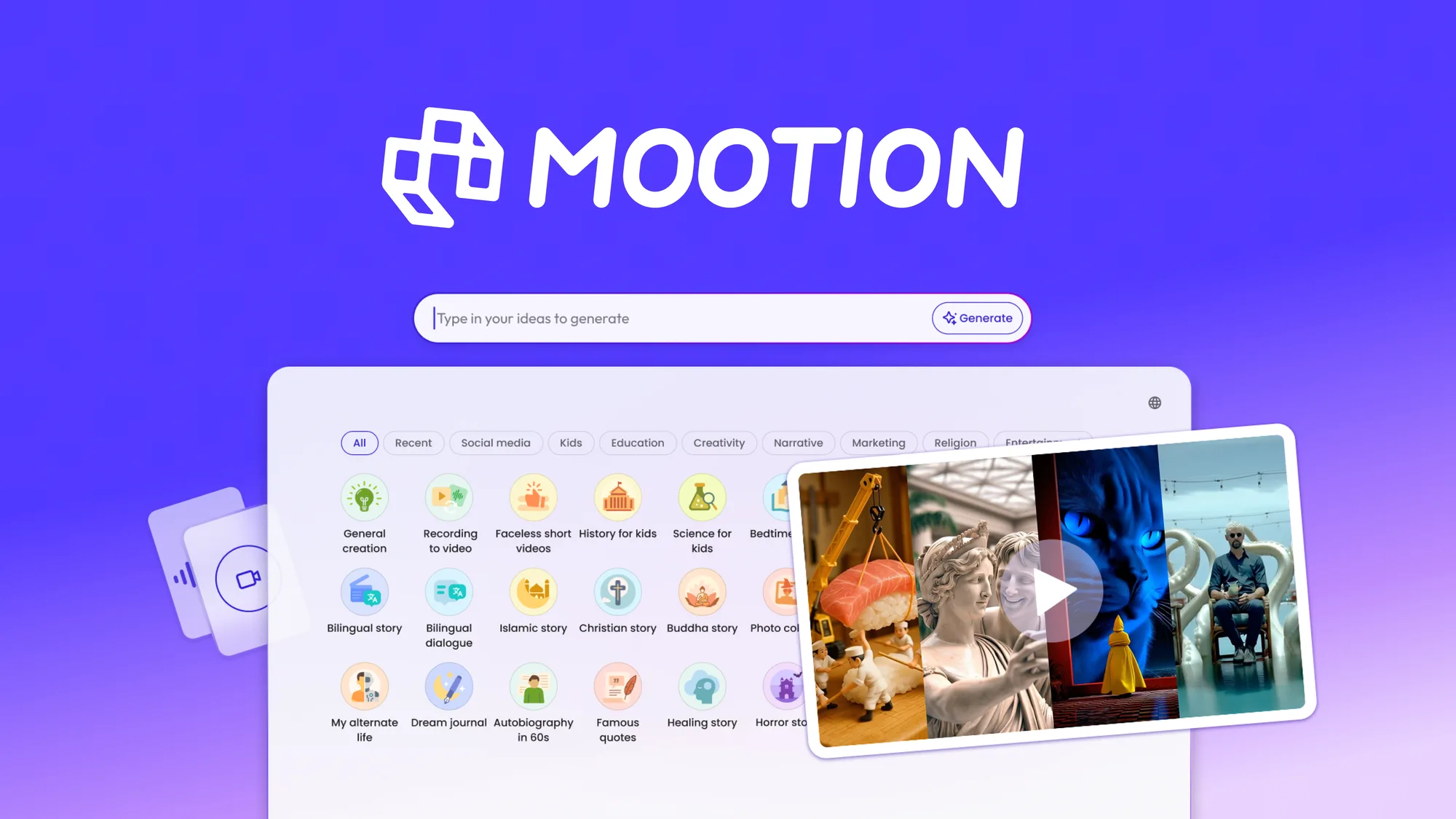
Mootion is a dynamic AI-powered tool designed to convert your creative concepts into visually captivating videos. By leveraging cutting-edge technology, Mootion enables users to transform text, scripts, images, and audio files into high-quality videos suitable for various platforms.
The platform provides customizable templates tailored for marketing, educational, and social media content, ensuring that videos maintain a professional appearance. Users can focus on content creation while Mootion handles the technical aspects, resulting in seamless and impactful storytelling.
Additionally, Mootion’s intuitive design requires no prior video editing knowledge, making it ideal for professionals and novices seeking an efficient solution for video production.
How to use Mootion?
Using Mootion is straightforward. Follow these steps to create engaging videos:
- Log into your Mootion account and access the video creation dashboard.
- Select or upload text, images, or audio files to include in your video.
- Choose a template that aligns with your project’s purpose.
- Customize the template by arranging your content and applying effects.
- Preview and export your completed video in the desired format.
Key Differentiators
One key aspect that distinguishes Mootion is its range of high-quality templates catering to diverse video needs. Whether for marketing, education, or social sharing, Mootion’s templates ensure your content remains effective and engaging.
Moreover, Mootion’s simple interface and rapid production capabilities allow users to efficiently create professional videos, saving both time and resources. Its ability to handle various media inputs positions Mootion as a versatile and valuable tool in video creation.
Pros and Cons
Pros
- Efficient conversion of text, images, and audio into videos
- User-friendly interface suitable for all skill levels
- Diverse templates tailored to different video purposes
- Lifetime access guarantees continual upgrades
- Cost-effective pricing compared to traditional editing software
Cons
- Inconsistent character appearance in some video outputs
- High consumption of credits during video generation
- Limited customization compared to advanced editing tools
Mootion offers a balance for users who prioritize speed and ease of use in video creation. While it may have limitations in customization and character consistency, its strengths in efficiency and accessibility cater to a broad audience.
Who Is It For?
Mootion is ideal for marketers, educators, and social media influencers seeking a reliable tool to produce compelling video content quickly. Its user-friendly nature makes it accessible to those without extensive editing skills, broadening its appeal to a wide audience.
Versatile templates enable businesses to create promotional content, educators to build interactive lessons, and influencers to engage their followers with attractive visuals, making Mootion a valuable asset in various professional settings.
See the product in action
Product images


Is it worth it?
Mootion provides a versatile solution for efficient video creation, offering great value for its price and catering to both novice and experienced video creators. Its selection of templates and ease of use aids those needing quick video solutions. Despite some limitations in customization, it remains a viable choice for users aiming to streamline their processes.
The $79 price point for lifetime access is reasonable considering its features and guarantees continuous updates, making it a sensible investment for those frequently engaging in visual media production. Overall, Mootion proves to be a reliable and accessible tool for various video content needs.

About Mootion
Compared to alternatives
| Feature | Mootion | [Competitor 1] | [Competitor 2] |
|---|---|---|---|
| AI Video Creation | Yes | Yes | No |
| Template Variety | High | Moderate | High |
| Price | $79 one-time | $99/month | $59/month |
| User Interface | Intuitive | Complex | Intuitive |
| Customer Support | Available | Limited | Available |
* Based on publicly available information.
What users are saying
What users like
Users report that Mootion simplifies video creation with its intuitive interface and efficient process. Most reviewers highlight the stunning visual styles and the range of templates available, which cater to different video types.
Common concerns
Some mention issues such as inconsistent character appearance and the high consumption of credits, which could impact those with limited resources or specific visual requirements.
FAQ
How do I activate my Mootion license?
You must activate your license within 60 days after purchase through your provided account.
Can I upgrade my license tier?
Yes, you can upgrade between the three license tiers while the deal is available.
Are there any restrictions on the use of templates?
Templates are included in the tool and are available for unrestricted use during the video creation process.
What if I want to downgrade my plan?
You can downgrade between the three license tiers within 60 days of purchase if needed.
Is there a money-back guarantee?
Yes, Mootion offers a 60-day money-back guarantee for user satisfaction.
Deal Terms
- Lifetime access to Mootion
- Includes all future Standard (Tier 1), Plus (Tier 2), or Pro (Tier 3) Plan updates
- If Plan name changes, the deal maps to the new Plan with updates
- Choose your preferred plan without codes or stacking
- Activate your license within 60 days of purchase
- Upgrade between 3 license tiers while the deal is available
- Downgrade within 60 days of purchase
- Available for new and previous users
Related products
SurFast Video Downloader: Easy Video Downloads
SurFast Video Downloader is your tool for seamless video downloads from over 1,000 websites. Ideal for content creators, educators, and marketing agencies,...

Followr Studio: AI Avatars & Viral Videos
Followr Studio is an innovative platform designed to transform your creative ideas into AI avatars and viral short videos. With its advanced...
Animazer: Stunning Promo Videos
Animazer is a powerful tool designed to help you create stunning promotional videos with professional flair. By offering a user-friendly interface and...