Sigma Media Manager: Optimize Your Media
Quick summary
- Efficiently organize your media library with nested folders.
- AI-generated metadata boosts SEO and discoverability.
- Cloud offloading reduces server load and improves performance.
- Integrated with leading cloud services for enhanced flexibility.
- Perfect for web professionals seeking streamlined workflow.
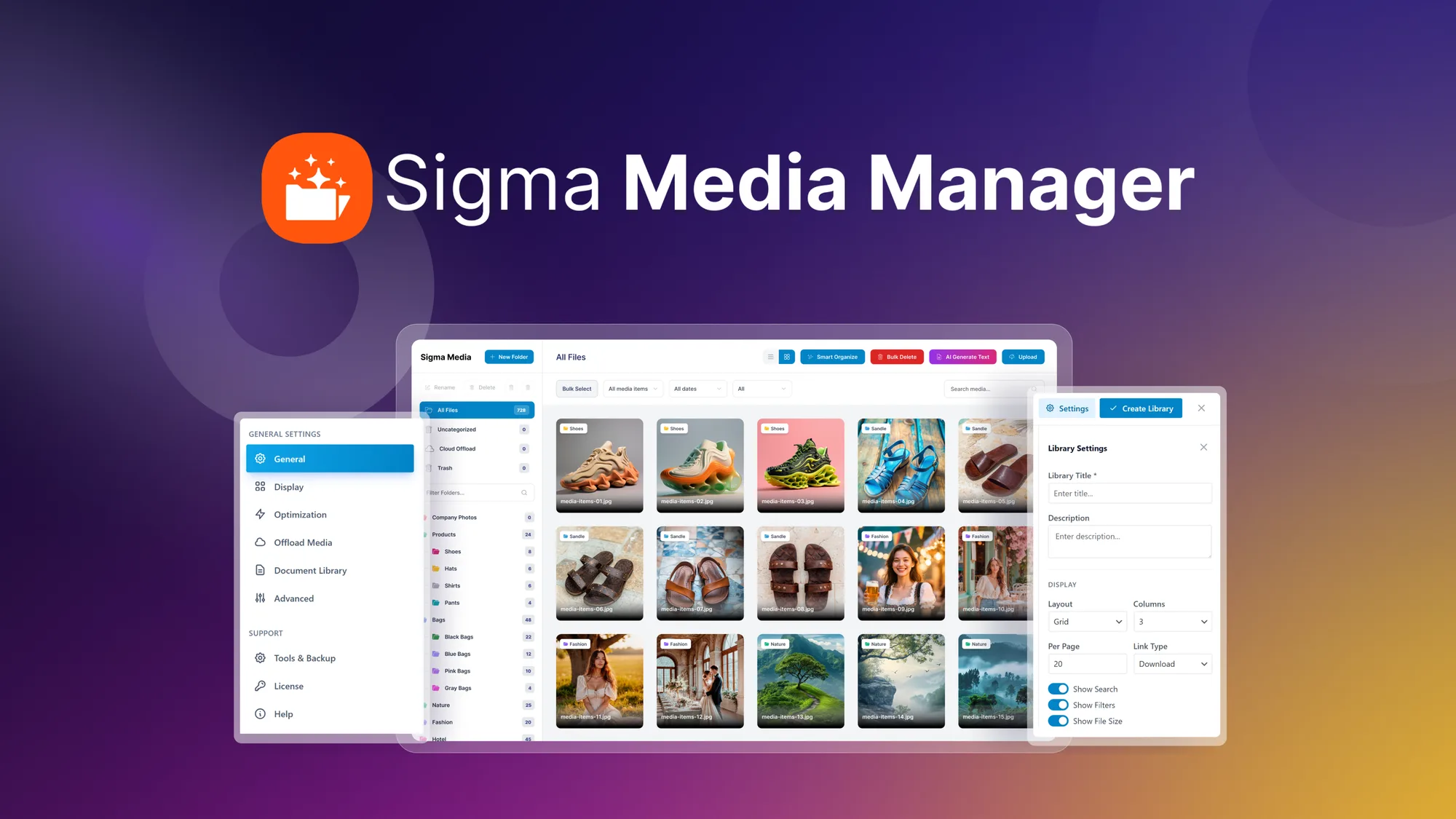
Sigma Media Manager is a tool that organizes your WordPress media library efficiently. It stands out with features like AI-generated metadata and cloud offloading, essential for freelancers and web design agencies. Enjoy an organized library with nested folders, filters, and custom tags that streamline your media management process.
With a significant discount, freelancers and agencies can take advantage of Sigma Media Manager‘s advanced features, including AI-powered text generation and robust integrations with popular cloud storage solutions. Dive into how this tool can transform your workflow and enhance your productivity.
What Sigma Media Manager Does?
Sigma Media Manager is designed to bring order and efficiency to your WordPress media library. By enabling users to sort files into nested folders, it simplifies searches with advanced filters and custom tags, ensuring any asset is instantly accessible. Its AI-powered system generates descriptive titles, captions, and alt text, enhancing SEO and accessibility.
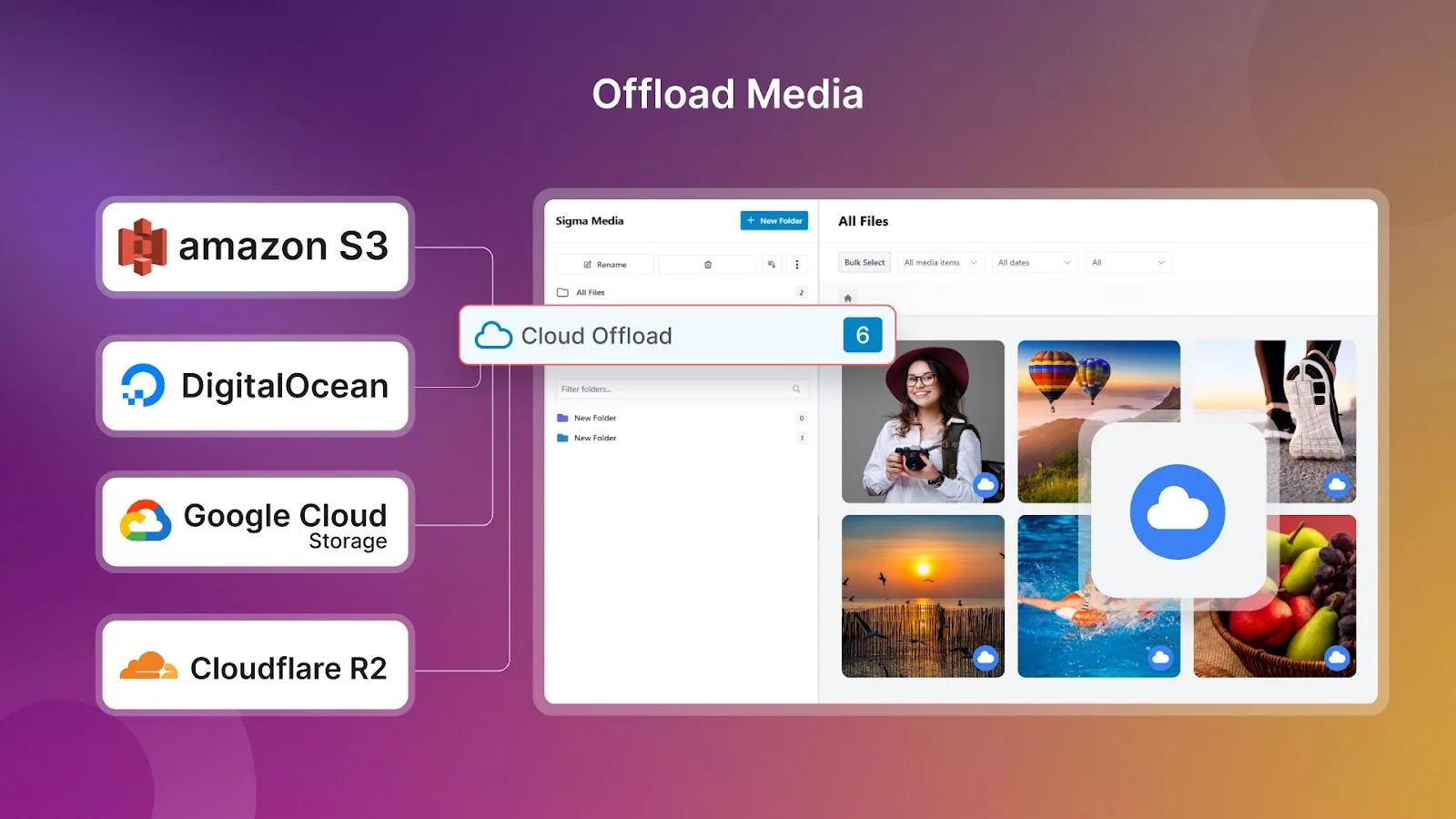
Furthermore, Sigma Media Manager offers cloud offloading capabilities, seamlessly integrating with platforms like Amazon S3 and Google Cloud Storage. This means you can safely store and protect media files externally, reducing server load and improving site performance. Additionally, it identifies and suggests deletion of unused files, helping you save valuable storage space.
From freelancers to large agencies, anyone dealing with extensive digital media collections will find Sigma Media Manager an invaluable asset, boosting productivity and offering peace of mind with robust file management solutions.
How to use Sigma Media Manager?
Getting started with Sigma Media Manager is straightforward. Here are some steps to maximize its use:
- Integrate Sigma Media Manager with your existing WordPress setup by following the guide provided.
- Utilize the nested folders to organize your current media files, creating a clear, structured library.
- Enable AI-powered metadata generation to enrich your files with useful information for better searchability.
- Offload media to cloud storage solutions to save space and enhance website performance.
- Regularly review and remove unused files to keep your media library tidy and efficient.
Key Differentiators
Compared to similar solutions like Cloudinary, Sigma Media Manager delivers unique value through its seamless WordPress integration and AI-powered metadata functionality. While Cloudinary offers robust media management, Sigma focuses more on enhancing internal workflows and simplifying media file management without leaving the WordPress environment.
The attention to WordPress-specific needs, such as media organization with nested folders, positions Sigma as a specialized tool for web design professionals. Furthermore, its robust cloud offloading surpasses alternatives by providing an integrated solution that harmonizes with popular cloud providers, allowing for greater flexibility and management capacity.
Pros and Cons
Pros
- Efficient media organization with nested folders
- AI-generated metadata improves SEO
- Cloud offloading conserves server resources
- Integration with major cloud platforms
- Ideal for web-focused professionals
Cons
- Occasional AI language limitations
- Initial setup can be daunting for non-tech users
- May require a learning curve to maximize features
Overall, Sigma Media Manager provides exceptional value, particularly in its niche market. While some initial setup complexities exist, the long-term benefits of structured media management and enhanced productivity far outweigh these challenges.
Who Is It For?
Sigma Media Manager is an ideal solution for freelancers, web designers, and agencies that require dependable, efficient media management within WordPress. Users who handle large volumes of media files will appreciate its organizational and metadata automation capabilities, reducing manual workload and improving operational efficiency.
Whether you’re optimizing a small freelance portfolio or managing extensive media assets for clients, Sigma’s features accommodate varied needs. Its strong integration with cloud services and AI technologies ensures users can tailor the experience to their specific workflows, making it a versatile addition to any digital toolkit.
Product images


At a glance
| Alternative to |
Cloudinary
|
|---|---|
| Integrations |
Amazon S3Digitalocean SpacesElementorGoogle Cloud Storage (GCS)WordPress
|
| Best for |
FreelancersWeb design agenciesWeb designers
|
Is it worth it?
In conclusion, the Sigma Media Manager offers a comprehensive solution for web professionals looking to enhance media management efficiency. Its AI-powered metadata capabilities and the ability to offload to cloud providers stand out as significant advantages. For the price of $39 compared to the original $100, it provides significant value and flexibility in managing WordPress media libraries.
The ease of use paired with powerful features like nested folder organization and robust integrations make it suitable for freelancers and agencies alike. For anyone seeking a cost-effective tool to streamline their media workflow, Sigma Media Manager presents itself as a smart choice.

About Sigma Media Manager
Compared to alternatives
| Feature | Sigma Media Manager | Cloudinary | Competitor 2 |
|---|---|---|---|
| Media Organization | Nested folders | Collections | Basic tags |
| AI Metadata | Yes | Limited | No |
| Cloud Integrations | Amazon S3, GCS | Extensive options | Limited options |
| WordPress Integration | Direct integration | Via plugins | No direct support |
* Based on publicly available information.
What users are saying
What users like
Users report a streamlined user experience with the folder organization feature, praising its ability to declutter media libraries effectively. Most reviewers highlight the usefulness of the AI-powered metadata feature in enhancing search and accessibility. Cloud offloading capabilities receive consistent positive feedback for improving server performance.
Common concerns
Some mention occasional language limitations in AI-generated text, which can pose difficulties in non-English contexts. Additionally, a few users note a degree of sluggishness when dealing with very large media libraries, suggesting room for optimization in handling bulk processes efficiently.
FAQ
What is the key benefit of using Sigma Media Manager?
Sigma Media Manager enhances WordPress media libraries with efficient organization tools and AI-generated metadata.
How reliable is the AI-generated metadata?
The AI-generated metadata is generally accurate and aids significantly in enhancing SEO and media discoverability.
Can Sigma Media Manager integrate with cloud storage platforms?
Yes, it integrates seamlessly with platforms like Amazon S3, Google Cloud Storage, and DigitalOcean Spaces for cloud offloading.
How does the license activation work?
You must activate your license within 60 days of purchase, with flexibility to upgrade while the deal is live.
Who would benefit most from using this product?
Freelancers and web design agencies handling large media libraries would find the most value from Sigma Media Manager.
Deal Terms
- Lifetime access to Sigma Media Manager
- All future Basic Plan (Tier 1), Business Plan (Tier 2), Agency Plan (Tier 3) plan updates
- If the plan name linked to your deal changes, it automatically transfers to the new plan with all updates
- Activate your license within 60 days
- You can upgrade while the deal is live but can only downgrade within 60 days of purchase
Related products
Unlimvideos: Unlimited Video Downloads
Unlimvideos provides unlimited downloads from a vast library of high-quality, licensed stock videos, catering to diverse creative projects. With more than 300,000...

Ethos: AI Brand Management Made Easy
Ethos is an AI-powered tool designed for brand asset management. It's tailored for professionals seeking to fortify their brand identity across various...
Ethos: Easy Brand Asset Management
Ethos is an AI-powered solution simplifying brand asset management. Offering a streamlined process for brand professionals, Ethos provides intuitive tools and integrations...