ImageColorizer – Colorize B&W photos and restore old pictures: ImageColorizer – Colorize B&W photos and restore: Easy
Quick summary
- Transform black & white photos into vibrant images effortlessly.
- Restore old pictures with advanced AI technology.
- Unlimited colorizations with easy-to-use interface.
- Ideal for graphic designers and photographers.
ImageColorizer is an innovative tool using the latest AI algorithms to add color to black & white photographs and restore old pictures. This software offers a unique solution for photographers and graphic designers who wish to bring historical photos to life or refresh old memories.
With ImageColorizer, you can expect clean enhancements and color additions that transform your images into vibrant pieces of art while maintaining their original essence. Its process is guided by efficient algorithms ensuring professional-grade results.
What ImageColorizer – Colorize B&W photos and restore old pictures Does?
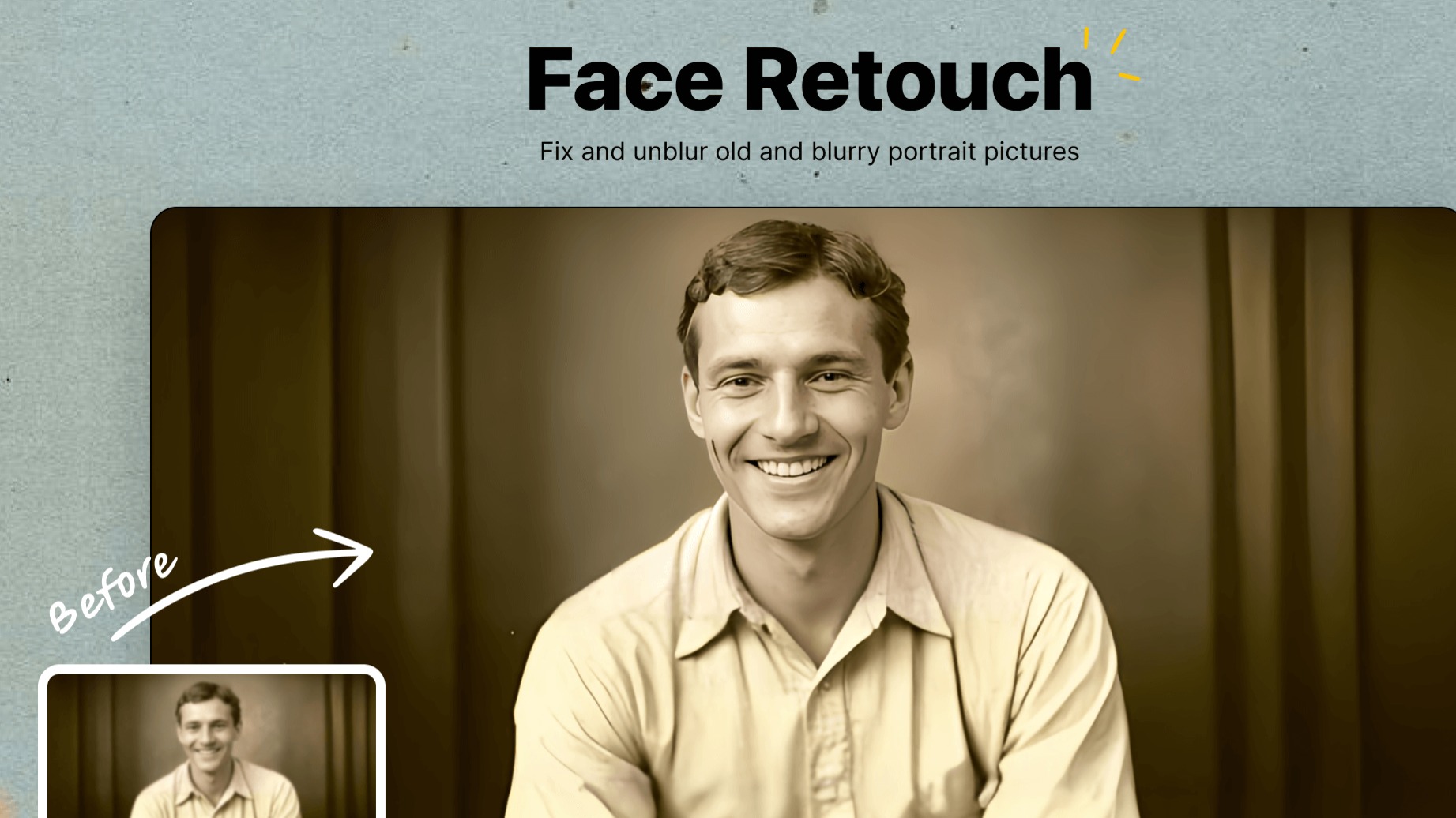
ImageColorizer is an advanced software that takes advantage of cutting-edge AI technology to infuse color into monochrome pictures and rejuvenate old, faded images. It provides a seamless workflow for transforming worn-out photographs into vibrant, modern visuals without compromising on quality.
The software’s capabilities extend beyond simple colorization. It unblurs images, enhancing and improving the quality of portrait photos. Damage in photographs, such as scratches and blemishes, is restored, giving pictures a new lease of life. By providing these services, ImageColorizer acts as a comprehensive toolkit for photo restoration.
Moreover, ImageColorizer is designed with user-friendliness in mind, making it accessible for both novice users and seasoned professionals. The intuitive interface ensures that high-quality results can be achieved with minimal effort, saving significant time and resources in photo editing tasks.
How to use ImageColorizer – Colorize B&W photos and restore old pictures?
Using ImageColorizer is straightforward, thanks to its intuitive interface. Here are simple steps to get started:
- Upload your black & white photo or an old picture you wish to restore.
- Select the colorization or enhancement options available within the tool.
- Allow the AI to process your image and perform the required transformations.
- Review the alterations and adjust settings if necessary for optimal results.
- Save the newly colorized or restored photograph effortlessly.
Key Differentiators
Unlike Adobe Photoshop, which requires a steep learning curve and may involve complex navigation for colorizing and restoration, ImageColorizer offers an automated process that simplifies these tasks. Its AI-powered features deliver impressive results without expecting users to be photo editing experts.
Compared to Canva, ImageColorizer focuses on high-end restoration and colorization. While Canva offers broad design capabilities, ImageColorizer specializes in bringing historical and old photographs back to life, providing specialized tools for pinpoint photo restoration, arguably making it a preferred choice for restoration-focused projects.
Pros and Cons
Pros
- Efficient colorization with AI technology.
- Unblur and repair with ease.
- User-friendly interface saves time.
- Unlimited colorization offerings.
- Comprehensive round-the-clock support.
Cons
- Resolution limitations on some photo formats.
- Occasional greenish hue issues in colorization.
- Limited advanced editing features.
Overall, ImageColorizer offers valuable strengths in automated color and restoration processes but has room for improvement in resolution quality and color precision.
Who Is It For?
ImageColorizer is ideal for graphic designers and photographers who frequently work with historical or vintage photos. It serves those seeking to breathe new life into old pictures without investing heavily in advanced software like Photoshop.
Its ease of use makes it suitable for hobbyists or small business owners looking to enhance or restore photographs efficiently. The tool’s robust features support a wide range of use cases, from personal projects to professional client work, ensuring flexibility and adaptability across different needs.
Product images


At a glance
| Alternative to |
Adobe PhotoshopCanva
|
|---|---|
| Best for |
Graphic designersPhotographers
|
Is it worth it?
ImageColorizer is perfect for graphic designers and photographers who seek an easy-to-use tool for colorizing and enhancing old photos. At $29.95 compared to the original $299, it offers tremendous value for those needing reliable photo enhancements consistently.
Its strengths lie in automated efficiency, attractive pricing, and ongoing updates, providing a solid foundation for extended use. While it might not replace full-fledged design software, for users focusing primarily on photo restoration, it’s a worthwhile investment.

About Vertexshare Limited
Compared to alternatives
| Feature | ImageColorizer – Colorize B&W photos and restore old pictures | Adobe Photoshop | Canva |
|---|---|---|---|
| AI-driven Colorization | Yes | Limited | No |
| Automated Photo Restoration | Yes | No | Partial |
| User-friendly Interface | Yes | No | Yes |
| Repair Physical Damage | Yes | Yes (manual) | No |
| Unlimited Photos | Yes | No | No |
* Based on publicly available information.
What users are saying
What users like
Users report satisfaction with the colorization quality and appreciate the tool’s efficiency in restoring old photos. Most reviewers highlight the user-friendly interface as a significant advantage, allowing them to achieve desirable outcomes swiftly.
Common concerns
Some mention occasional inconsistencies like a greenish tint in colorized photos. Users note resolution constraints, particularly with larger files or those needing high detail.
FAQ
How does the colorization process work?
ImageColorizer uses AI algorithms to analyze black & white photos and apply natural, realistic colors automatically.
Can the tool repair physical damage like scratches?
Yes, the software can digitally repair photos by removing scratches and enhancing picture quality.
Is there a limit on how many photos I can colorize?
There is no limit; you have unlimited access to colorize photos as part of your plan.
What file types are supported?
ImageColorizer supports major photo file formats including JPEG and PNG for maximum compatibility.
Deal Terms
- Lifetime access to ImageColorizer Plan
- You must redeem your code(s) within 60 days of purchase
- All future ImageColorizer Plan updates
- This deal is not stackable
Related products
Unlimphotos: Authentic Stock Photos
Unlimphotos is a growing collection of 12M+ authentic stock photos. Ideal for creators, marketers, and small businesses, it offers exceptional value by...

FlipLink.me: Turn PDFs into Flipbooks
FlipLink.me is a powerful platform that transforms your PDFs into interactive online Flipbooks. With customization, sharing, and performance analysis features, it caters...
Watermarkup: Customizable Watermarks
Watermarkup is a specialized software designed to add batch watermarks to your images. This powerful tool helps protect your photos from unauthorized...